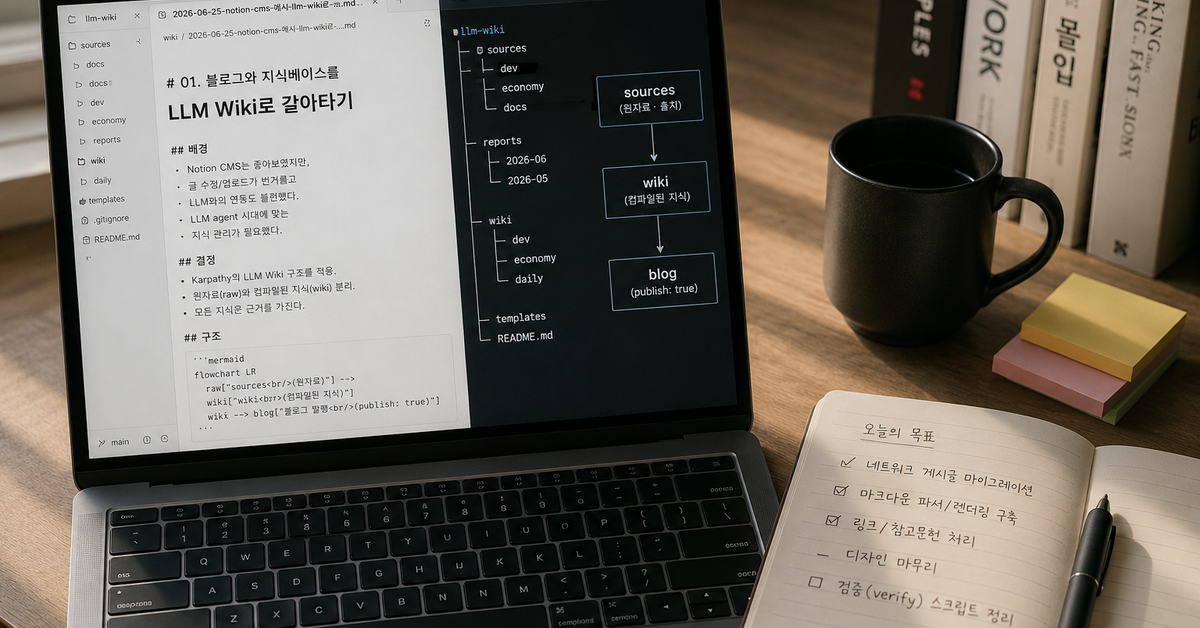
Let's Build a Blog of My Own
"The editor is great and the integrations are plentiful — let's build a blog with Notion as the CMS." That single thought was all it took for me to build a Notion-CMS-based blog. I was proud enough of the process to write it up as my first post — that's how much I poured into it.
All that's left now is writing blog posts! ...or so I thought (reality had other plans)
But once it was actually built, posts didn't pile up the way I'd imagined. Organizing was always the problem, more than the studying itself. To properly capture what I'd learned I had to draw diagrams, and that's exactly where I'd run out of steam and give up, more often than not...
I'd mostly been using AI agents for writing, and this flow never meshed smoothly with Notion. I get Claude or ChatGPT to review a draft and polish it in markdown — but to publish, I had to convert all of that back into Notion's syntax. And when I wanted to pull up posts I'd already written and query them, it only worked with a separate process bolted on top, like setting up the Notion MCP (plus looking up the Notion API Key and Database ID every single time, since there's no way I'd have them memorized...).
From a developer's perspective it was just as frustrating. The structure was tightly coupled to the Notion API (@notionhq/client) and react-notion-x, which made customization difficult. At one point after the initial build, the Notion API changed and I had to rework the logic across the board just to upgrade the @notionhq/client package; and with react-notion-x owning the entire rendering, even for a small design tweak, fixing a single line of CSS was no easy task... I had to force styles onto the DOM the library spat out, not markup I had written myself. Pulling data out and using it in the build was labor-intensive too, since the Notion API is anything but friendly, and because image URLs expired on private pages, I had to leave every post public.
Using Notion this way, contrary to what I'd first imagined, actually landed me in a situation where writing was hard and developing was hard too.
Worse, with a structure this dependent on Notion, the day Notion decided to change its pricing policy would have been a straight-up critical hit.
Actually, back when I first built the blog, markdown was on the table too. At the time it seemed short on integrations and awkward to write in, so I passed — but looking again recently, those worries had mostly evaporated. On top of that, studying development and economics and this and that, I'd started to want to pull my scattered knowledge bases into one place to integrate and analyze them. And while I was at it, I wanted to hand the organizing — the part that always wore me out — over to an AI agent. If AI does the writing, consistent formatting and tone come for free, and all I have to do is check that the content is right.
That's how the scales tipped, and in the end I decided to tear down the knowledge base (Notion) and the blog entirely.
Bye Notion, Welcome LLM Wiki!
Once I had committed to the rebuild, I started by writing down the conditions the new knowledge base absolutely had to meet.
| Point | Details |
|---|---|
| Can I easily write documents with Claude and ChatGPT? | Notion required MCP; without it, I had to write in markdown and convert everything by hand. |
| Can Claude and ChatGPT query the knowledge base? | Notion is hard for LLM agents to query directly. (It's possible with the Notion MCP, but that takes separate setup.) |
| Can Claude and ChatGPT query it without extra infrastructure (RAG)? | An LLM wiki is a structure that LLM agents manage and regenerate directly, so it works without extra infrastructure. |
| Can I use visualizations and formatting like Mermaid and callouts? | Notion has plenty of integrations, but this much is perfectly achievable on top of markdown. |
| Can knowledge and blog posts be kept separate? | An LLM wiki keeps source and wiki apart, with the wiki compiled from the sources — and only the wiki pages flagged publish: true go out to the blog, so knowledge and blog posts separate naturally. |
| When knowledge keeps getting updated, can that be reflected automatically — without hallucination — and propagated to related posts? | An LLM wiki is self-evolving by design: an LLM agent judges and corrects contradictions based on each document's sources, and updates related posts connected by wikilinks along the way. |
What's an LLM Wiki?
The LLM wiki is a concept championed by Andrej Karpathy, and it had actually been shared at my company once before. Honestly, back then I didn't really feel the need for it and let it slide past me. But once I actually needed "a self-growing knowledge base optimized for LLM agents," it was a story I had no choice but to dig back up.
So I went back and properly reread Karpathy's LLM Wiki, which I had only skimmed before — and it fit my current problem almost uncannily well. The core is the rule of separating raw material (raw) from compiled knowledge (wiki), where the wiki must be written strictly from the raw sources. Thanks to this, every conclusion carries its provenance, and when new material comes in, the LLM patches up the outdated information, making existing articles sturdier.
Being able to hand writing, editing, and even the most headache-inducing part — maintenance (refreshing outdated information) — to an LLM agent with minimal human intervention was attractive enough that I couldn't ignore it.
That said, what good is a post that's only pleasant for an LLM agent to read — in the end it has to be easy for humans to read. Even in markdown, diagrams and formulas can be expressed and rendered well enough with Mermaid and KaTeX. Notion may have more integrations, but given the kind of posts I write, this much support was plenty.
There was no reason to put it off any longer. I decided to move the blog and the knowledge base to an LLM Wiki in one go.
Building My Own Knowledge Base with an LLM Wiki
I kept the broad framework of Karpathy's LLM wiki, but fleshed it out to fit my situation and goals and shaped the structure my own way.
First, the big skeleton. I mostly study a range of development topics, but lately I've been dipping into economics too, so to house both under one roof I organized things with top-level topics like 경제 (economy), 개발 (development), and 일상 (daily life), each holding sources/ (raw material) and wiki/ (compiled notes). Material that changes over time, like market prices, gets snapshotted separately in reports/ with a reference date so it never gets mixed in.
KNOWLEDGE_BASE/
├─ 경제/ · 개발/ · 일상/      # 대주제
│  └─ <세부주제>/            # 예: 개발/데이터베이스
│     ├─ sources/           # 원자료 (불변·출처)
│     ├─ wiki/              # 근거 기반 정리본 (kr/en/ja)
│     └─ reports/           # 시점 스냅샷 (시세 등, 해당 주제만)
├─ index.md                 # 발행 카탈로그
└─ README.md
With the skeleton in place, I filled it with actual knowledge. I migrated the posts written in Notion over using the Notion MCP, and attached the material each post referenced to sources/ as provenance. And then, post by post, "where did this claim come from" started attaching itself automatically.
The knowledge base in Obsidian's graph view. Gray dots are source and wiki notes, green dots are tags, and yellow dots are attachments like images. Notes on the same topic clump into clusters, with wikilinks and tags bridging between them.
Just like the line "Obsidian is the IDE, the LLM is the programmer, and the wiki is the codebase", actually opening Obsidian and seeing at a glance how the posts are woven together in the graph view made me weirdly proud.
I Rebuilt the Blog From Scratch Too
With the knowledge base ready, it was time to make the blog read from it. The old r3gardless.dev fetched metadata from a Notion DB at build time and rendered the body with react-notion-x, so both the data source and the renderer were firmly tied to Notion. Removing that dependency was the heart of the work.
The very first step was ripping the Notion API dependency out of the build pipeline entirely. Instead, the blog now pulls in the knowledge repository KNOWLEDGE_BASE, selectively copies only publish: true posts and the assets they need into content/posts/, and reads nothing but that output. Private notes and raw sources never make it into the artifacts in the first place.
For the renderer, I dropped react-notion-x and rebuilt it as a remark/rehype pipeline. It now supports GFM tables, checklists, strikethrough, and footnotes, plus code blocks, KaTeX, Mermaid, and GitHub alerts — with Mermaid handled as a client component so it stays safe even in static export. Wikilinks in the body resolve to /blog/<slug> for published posts, or to the source_url for unpublished sources.
Before — built from the Notion API
After — built from local Markdown
The last job was reviving the wrecked appearance. Pulling out the Notion renderer broke the typography, spacing, quote, and code styles, so I wrote a fresh markdown.css and re-tuned the Pretendard body text, the existing tone, and light and dark modes. I also restored the behavior where clicking a category or tag jumps to a search filter.
On top of all this, I laid down a much sturdier CI than before. It verifies everything in one pass — typecheck, lint, tests, then the content build, the Next build, and even a smoke test that checks the actual out/ HTML for the required markers — and it runs automatically on every PR. The big migration happened on a separate branch, and the small follow-up tasks were split up against main, each passing CI before being merged. (For details, see the r3gardless.dev GitHub repository.)
That's how the knowledge base and the blog came together into a single flow. From a post being written to being published, here's the whole flow I built, in one picture.
What Got Better
For starters, writing and publishing posts is noticeably easier. With the formatting and tone-and-manner registered as SKILLs, the format stays consistent instead of drifting all over the place (probably better than a human would manage, I suspect). Above all, the biggest win is being able to register knowledge into the knowledge base and query it with Claude or Codex, no matter the environment. It's also been great that whenever new information goes in, the SKILLs and lint rules automatically validate the formatting and even check for contradicting information. And finally, the Notion dependency is gone, so there's no more holding my breath over whether some policy will change.
Here's a rough list of the skills I've registered and use:
| skill | Role |
|---|---|
kb-note | Decides the template every note follows — from the frontmatter down to the body skeleton |
kb-style | Keeps the writing voice and look consistent — style, emphasis, and callout rules |
kb-curate | Decides where files go and what they're named, keeps the catalogs in order, and checks for anything broken |
kb-ask | Ask "is this in the knowledge base?" and it finds the notes and answers with sources |
kb-synthesize | Pulls multiple notes together into digests, comparison tables, and index pages |
kb-i18n | Translates published posts into English and Japanese, and keeps them in step when the original changes |
kb-map | Draws relationship diagrams and timelines, only when asked |
On top of that, since the structure is markdown-based, multilingual (i18n) expansion became genuinely doable. Honestly, this is something LLMs made possible.
Now, I only edit the single Korean original, and an LLM agent regenerates the English and Japanese documents on its own, leaving structure like code, tables, and wikilinks untouched. Git diffs let me pick out exactly what changed and re-translate just that, so the sync stays accurate. This very post is managed that way — the English and Japanese translations kept in step with the Korean original.
Cramming multiple fields into one repository turned out to be quietly great, too. Reading vector quantization papers like RaBitQ, math concepts like the Johnson-Lindenstrauss transform keep popping up — and I used to look them up on the spot and promptly forget them. Now, whether it's math or physics, I just leave a note and wire it up with wikilinks. Even across different fields, the knowledge links together.
| Improvement | Details |
|---|---|
| Writing and publishing | Write and publish easily in a consistent format. AI verifies formatting and outdated information based on the SKILLs. |
| Browsing and querying | Find documents and ask questions through LLM agents |
| Dependency | The Notion dependency is gone, so policy changes are no longer a worry |
| Multilingual (i18n) | Generate per-language documents from one original and manage them together with Git |
| Knowledge integration | Development, math, physics, and other fields all connect through wikilinks in one repository |
In the end, here's how Notion and the LLM Wiki split, at a glance.
| Item | Notion | LLM Wiki |
|---|---|---|
| Source of Truth | Notion | Markdown |
| Git | ❌ | ✅ |
| AI editing | Limited | Very easy |
| Refactoring | Hard | Easy |
| Cross-link | Limited | Wikilink |
| Version control | Limited | Git |
Remaining Thoughts
Ripping out the Notion integration I had worked so hard to wire up, with my own hands, was honestly not an easy decision. But in an era where I lean on LLM agents this much, I think it was something I would have had to go through eventually.
There are things I haven't gotten to yet.
- RAG infrastructure: With not much material yet, LLM search is enough for now, but once the volume gets huge, separate infrastructure may become necessary.
- Accumulating material: The skeleton is barely up; for the knowledge base to really pull its weight, I need to keep filling it in.
Still, things now move in a direction where the more material piles up, the sturdier the wiki gets.
TIP
Posts I'd study and never look at again have become knowledge I can query and update anytime. In the end, that one thing is what I tore up the whole blog for.
Have I really finished the blog development this time...?